easiest way to find your serial number
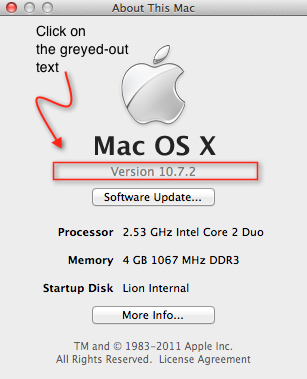
Click > About This Mac… then click on the greyed out text underneath the black ‘Mac OS X‘.
It probably says ‘Version 10.7.2’. When you click on it, it will change to the OS build number. Click on it again and you’ll see your serial number. Easy 🙂


Posted on January 1, 2012, in OS X Lion, Snow Leopard and tagged Air, apple, can't, code, find, how to, Mac, Macbook, MBP, OS X, product, serial, serial no, serial number, where is. Bookmark the permalink. Leave a comment.



 applehelpwriter.com
Leave a comment
Comments 0